Mobile App
RecipeNest
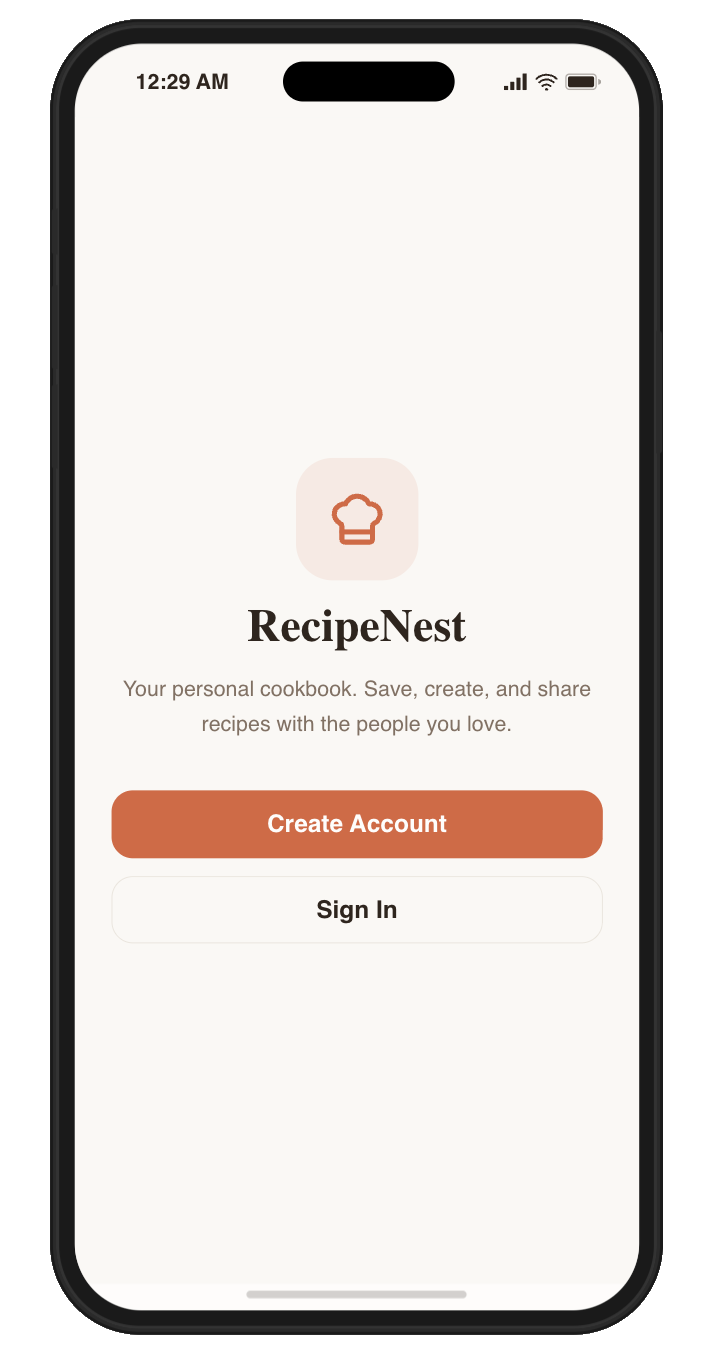
A recipe-sharing platform designed to preserve family recipes and discover new recipes with friends and family.
Role: Product Designer
Tools: Figma, Lovable
Duration: 1-2 weeks
Type: Personal product concept
PROBLEM
Most recipe apps focus on discovering new recipes rather than preserving meaningful ones.
In my own experience, my mom created a physical cookbook for me before college, but I did not bring it with me. I also saved recipes in phone notes and social media, but those were easy to lose track of.
The result was a familiar problem: the recipes I cared about most were the hardest to keep organized and accessible.
- Family recipes get lost over time
- Physical cookbooks are inconvenient to carry
- Notes apps become disorganized
- Recipe apps often feel overwhelming
Target Users
RecipeNest focuses on users who want to preserve meaningful recipes and share them within personal communities.
Primary users
- Young adults learning to cook
- Families sharing recipes across generations
- Beginner cooks who want simple guidance
Secondary users
- Home cooks who enjoy sharing recipes
- Communities centered around food
RESEARCH
Goal
- How people discover recipes
- Where people store recipes
- How people share recipes with friends or family
- Frustrations with recipe apps or current storage methods
- Whether people value preserving family recipes
Interview
- I conducted semi-structured interviews with 4 participants
- Each interview lasted approximately 10-15 minutes and focused on cooking behavior, recipe discovery, storage habits, and sharing practices.
Participants
- Beginner cooks
- Frequent home cooks
- Individuals who rarely cook but still save recipes
Secondary Research
I conducted a competitive analysis of existing recipe platforms including Yummly, Tasty, Paprika Recipe Manager, NYT Cooking, and TikTok. Many platforms focus on recipe discovery or storage, but few support personal recipe preservation and sharing within close communities.
Competitors: Yummly, Tasty, Paprika Recipe Manager, NYT Cooking, TikTok
Gaps:
- Limited family recipe preservation
- Minimal private sharing tools
- Impersonal recipe collections
- Weak long-term storage
Design Implications
Based on the research findings, several design priorities emerged:
- Provide a simple way to save and organize recipes
- Allow private sharing between friends and family
- Support preserving meaningful family recipes
- Enable users to create structured recipe collections (cookbooks)
“I usually screenshot recipes or save them in my notes, but I can never find them later.”
Research Insights
Recipes are scattered across many platforms
Participants reported saving recipes across TikTok, Google, screenshots, and notes apps, making them difficult to find later.
One participant mentioned frequently losing recipes saved in screenshots or message threads.
Family recipes are difficult to preserve
Several participants described meaningful recipes passed down from parents or grandparents that were stored informally in notes apps or simply remembered.
One participant explained that many family recipes exist only in memory and could easily be lost.
Existing recipe apps feel overwhelming
Most participants stored recipes in long lists of notes, screenshots, or bookmarks without any structured organization.
As a result, users often struggled to find recipes they previously saved.
DESIGN
Flow Diagram
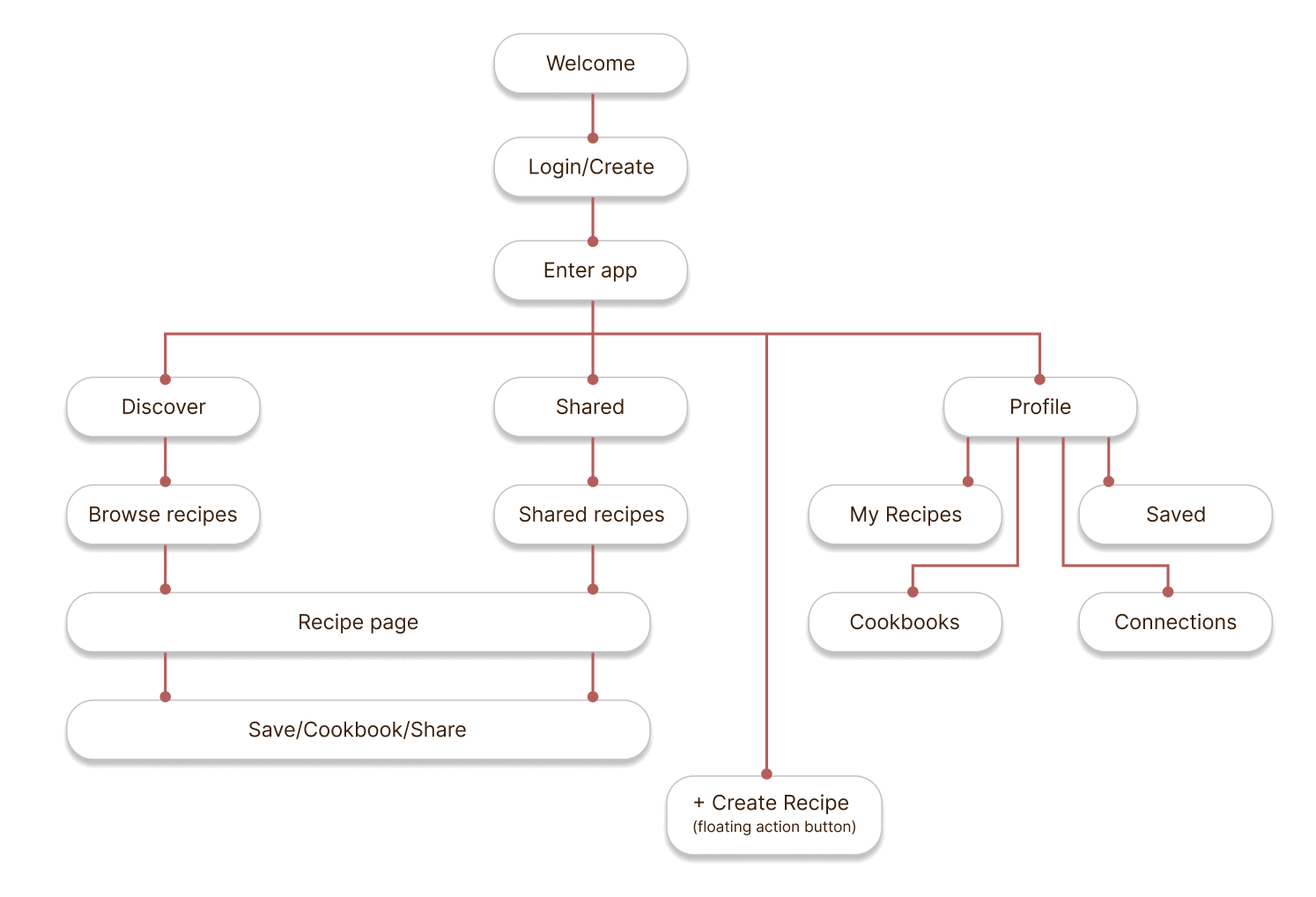
RecipeNest is structured around three core experiences: discovering public recipes, viewing recipes shared by connections, and managing personal collections.
Wireframe
After defining the product structure, I created low-fidelity wireframes to map the layout and content hierarchy for each core screen.
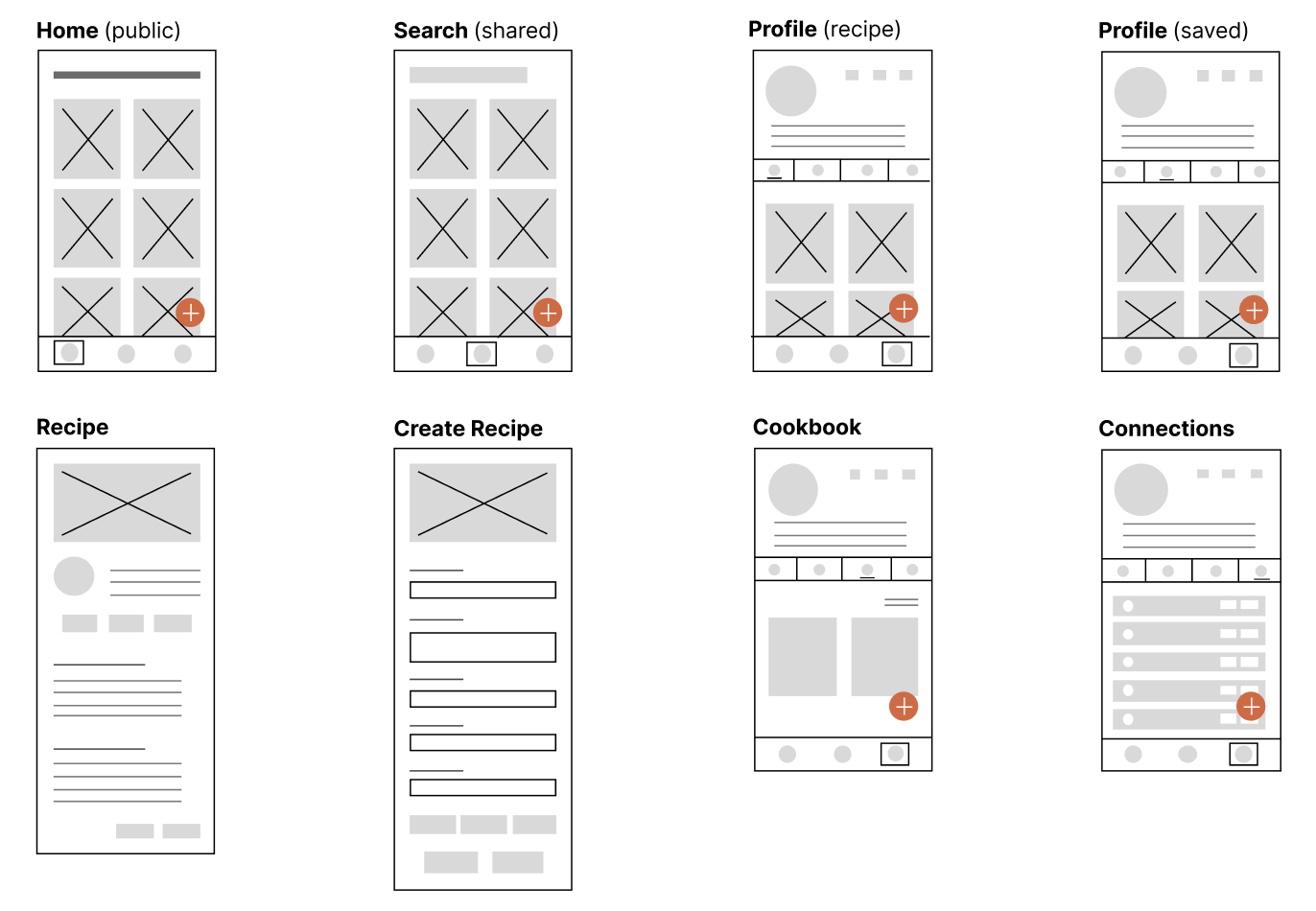
- Card layout allows users to quickly browse multiple recipes
- Bottom navigation provides quick access to Discover, Shared, and Profile
- Floating action button allows users to quickly create new recipes
- Profile acts as the hub for managing recipes, cookbooks, and connections
Designs + High Fidelity
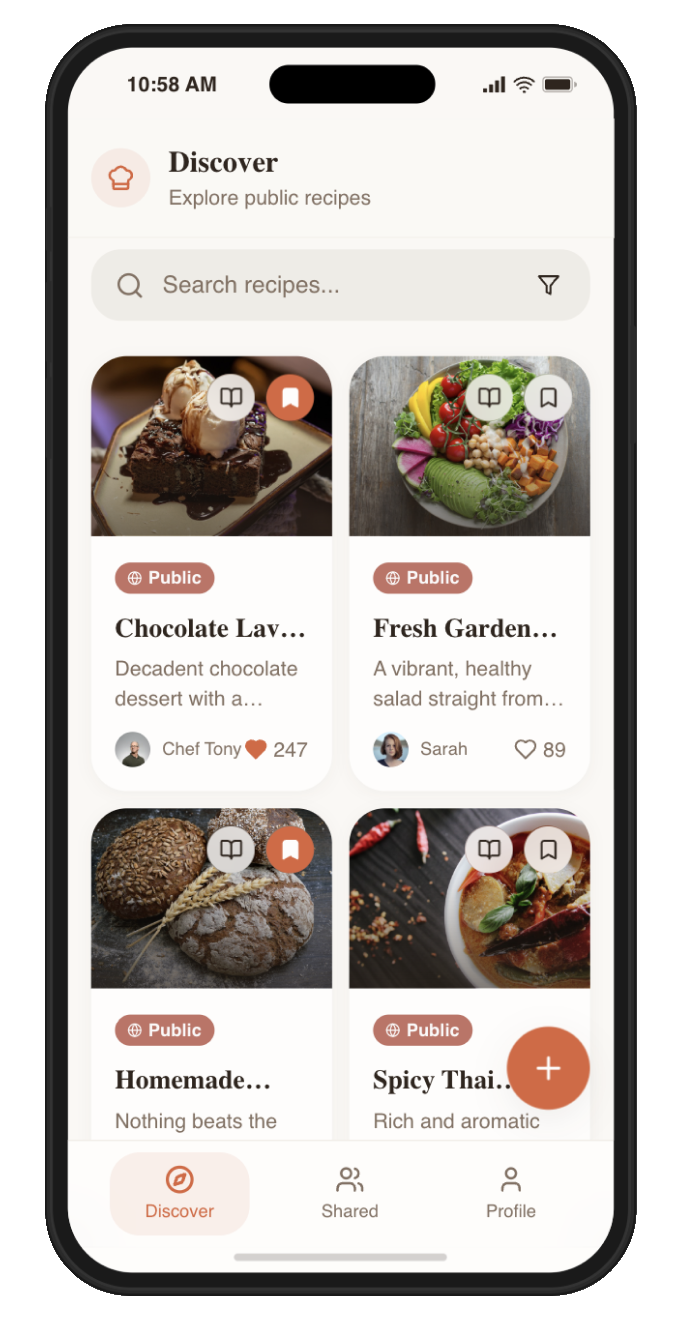
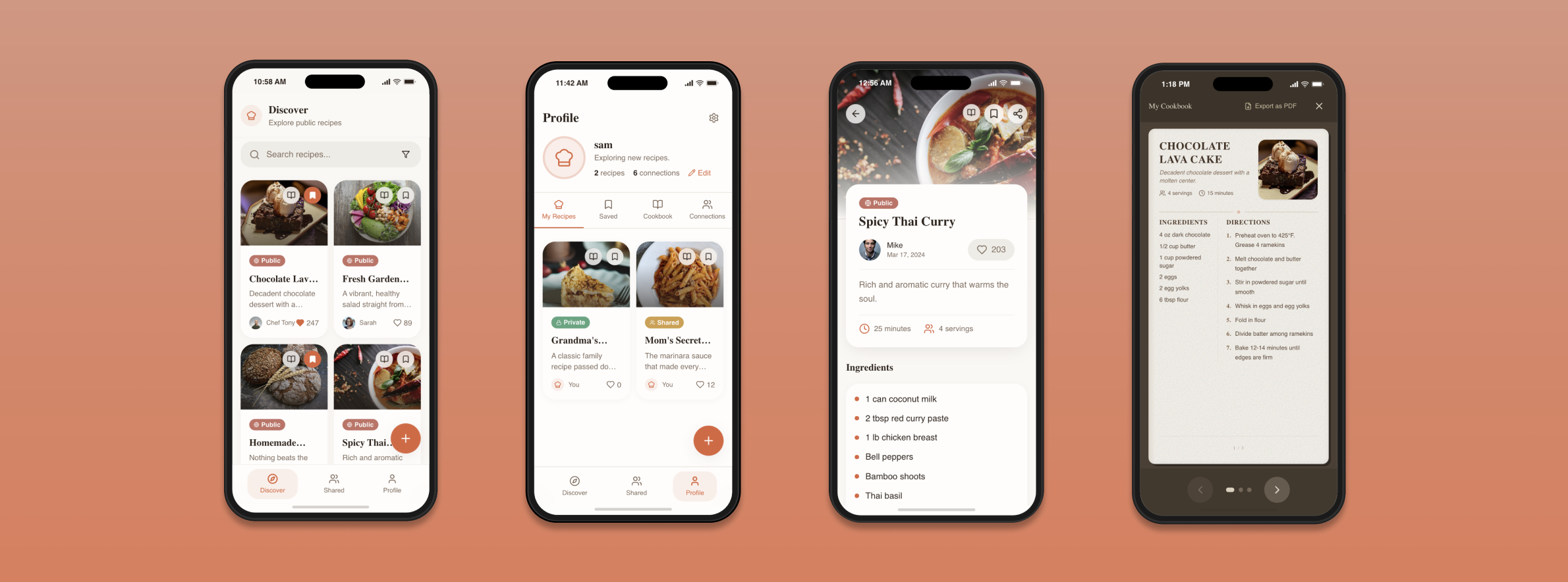
The Discover tab highlights public recipes using a card-based layout that allows users to quickly scan and browse multiple recipes.
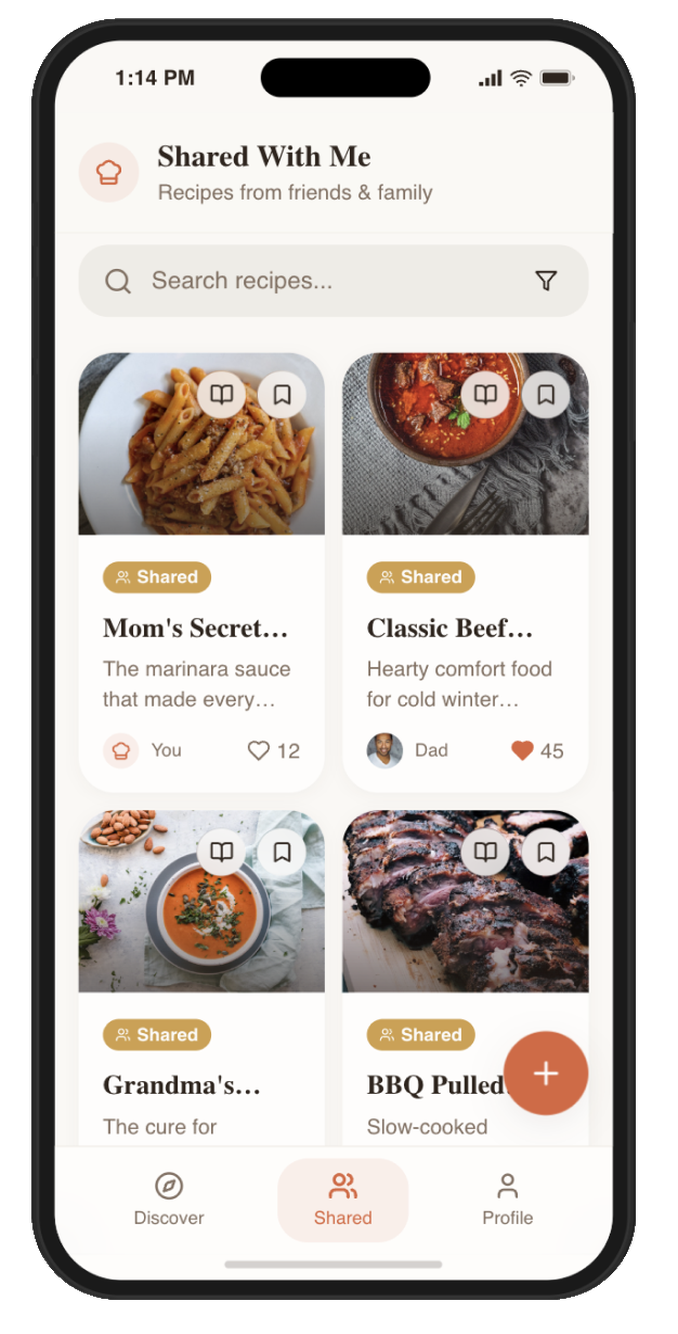
The Shared tab surfaces recipes from connections, making it easy to explore recipes from friends and family.
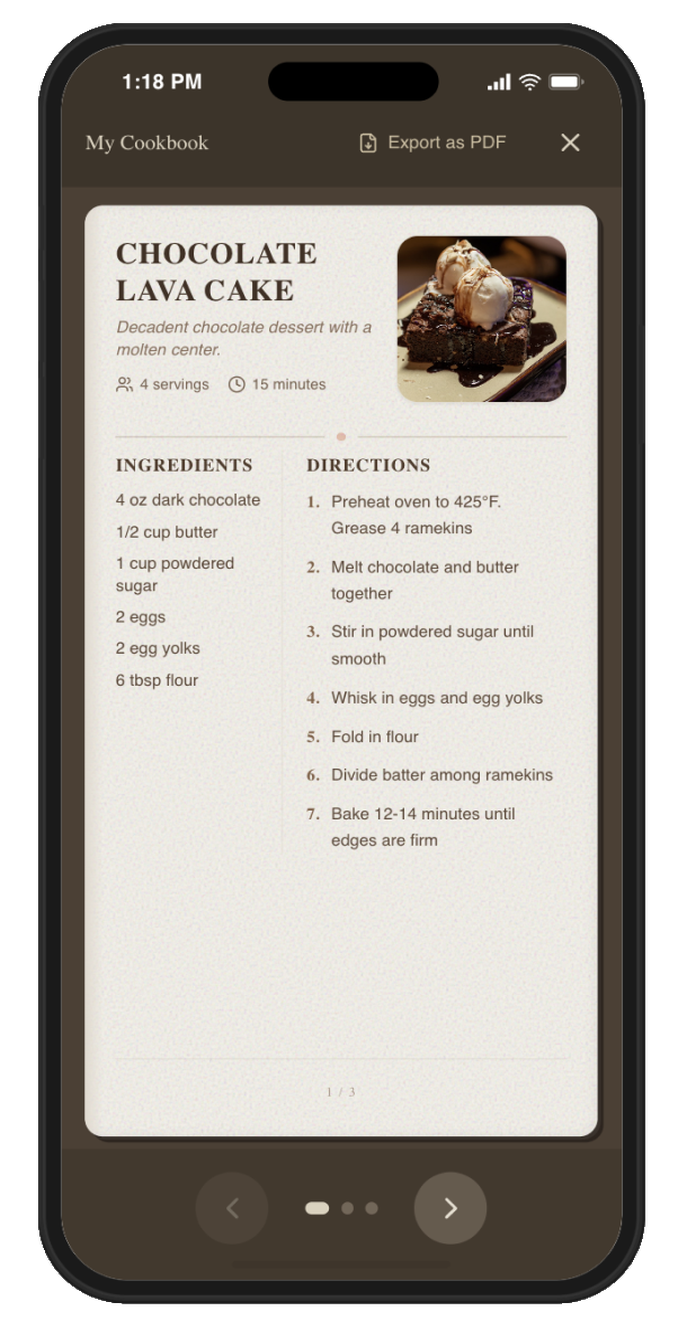
Cookbooks allow users to organize recipes into curated collections. Recipes can be compiled into a shareable, book-style format that can be exported as a PDF.
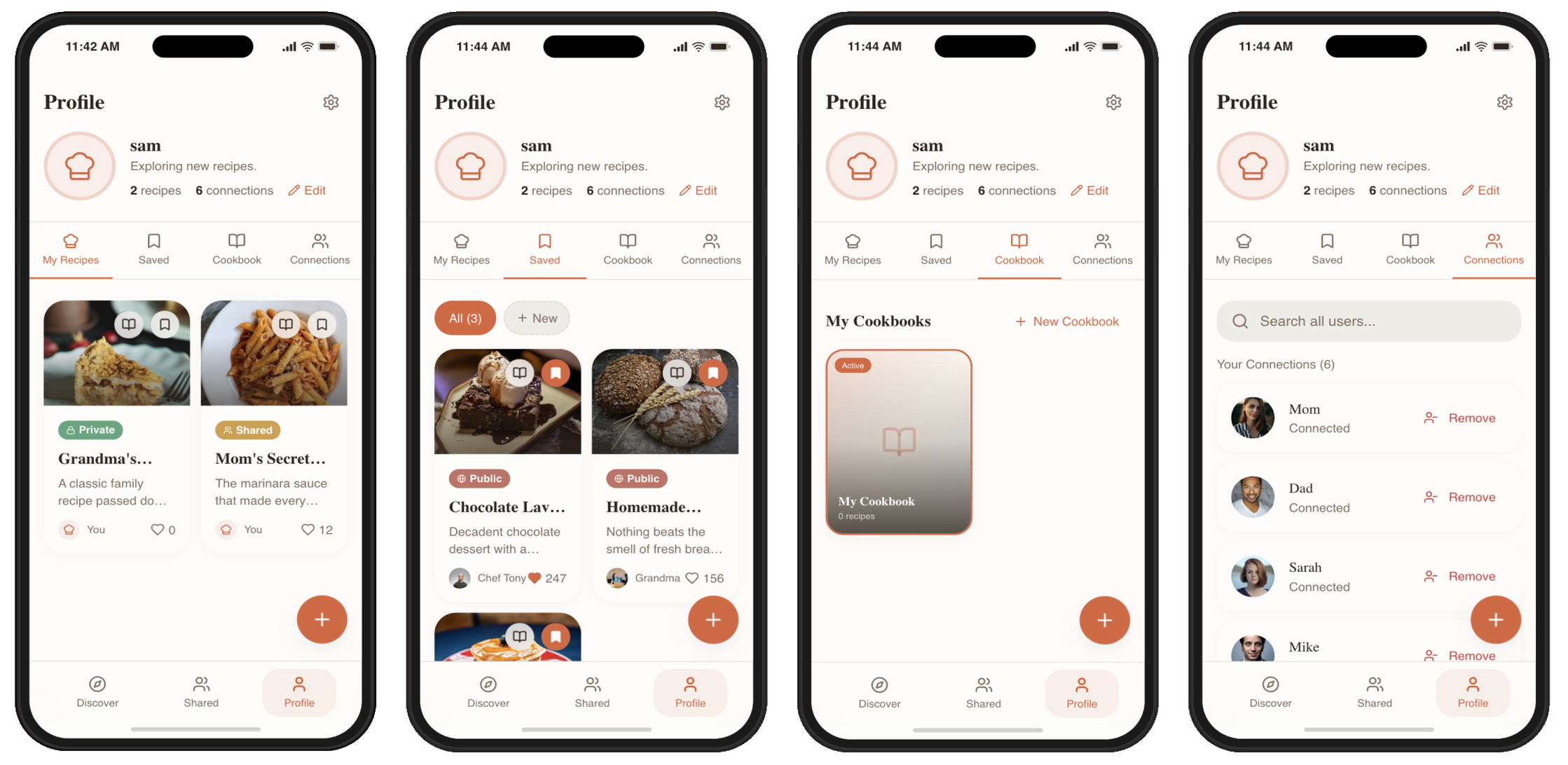
The profile section acts as the personal hub for managing recipes, saved collections, cookbooks, and connections.
The recipe creation screen allows users to easily add new recipes by entering key details such as ingredients, steps, cooking time, and servings. Users can also choose whether the recipe is private, shared with connections, or public.
The recipe page prioritizes readability, separating ingredients and instructions while keeping key information such as cook time and servings visible.
Key Design Decisions
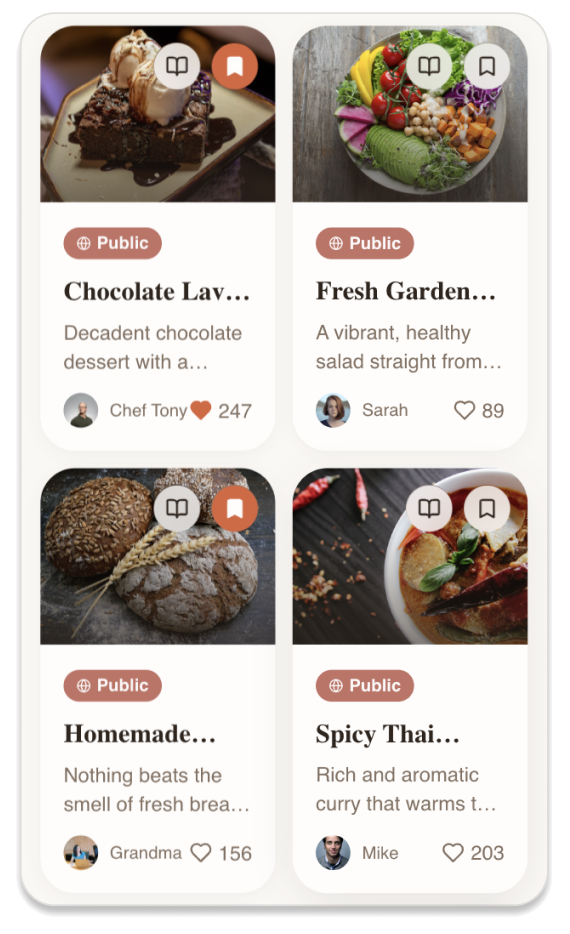
Card-Based Recipe Browsing
Problem: Users need to quickly scan many recipes.
Decision: Use a visual card layout on the Discover page.
Impact: Improves browsing speed and makes recipes more visually engaging.
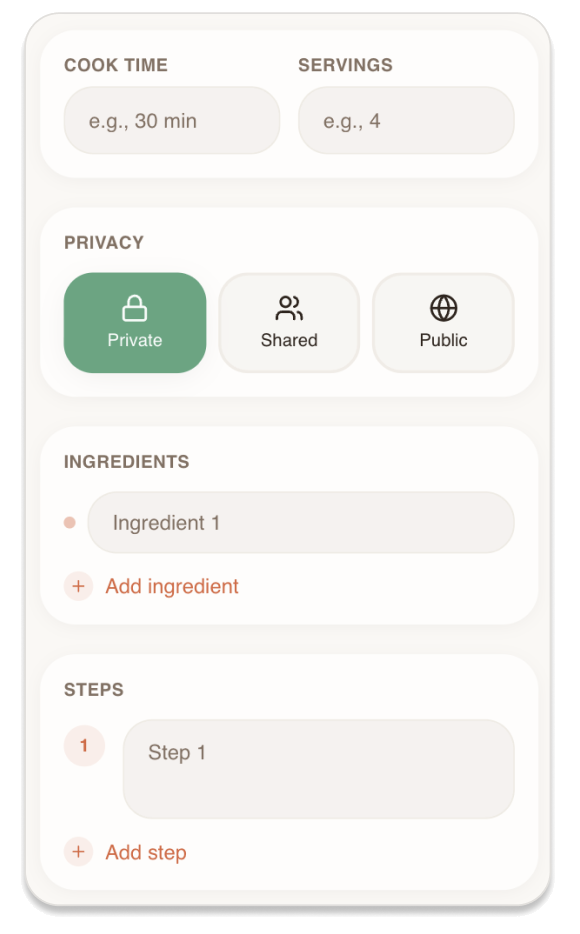
Simple Recipe Creation Flow
Problem: Adding recipes manually can feel tedious.
Decision: Use structured fields for ingredients, steps, cook time, and servings.
Impact: Makes recipe creation faster and ensures consistent formatting.
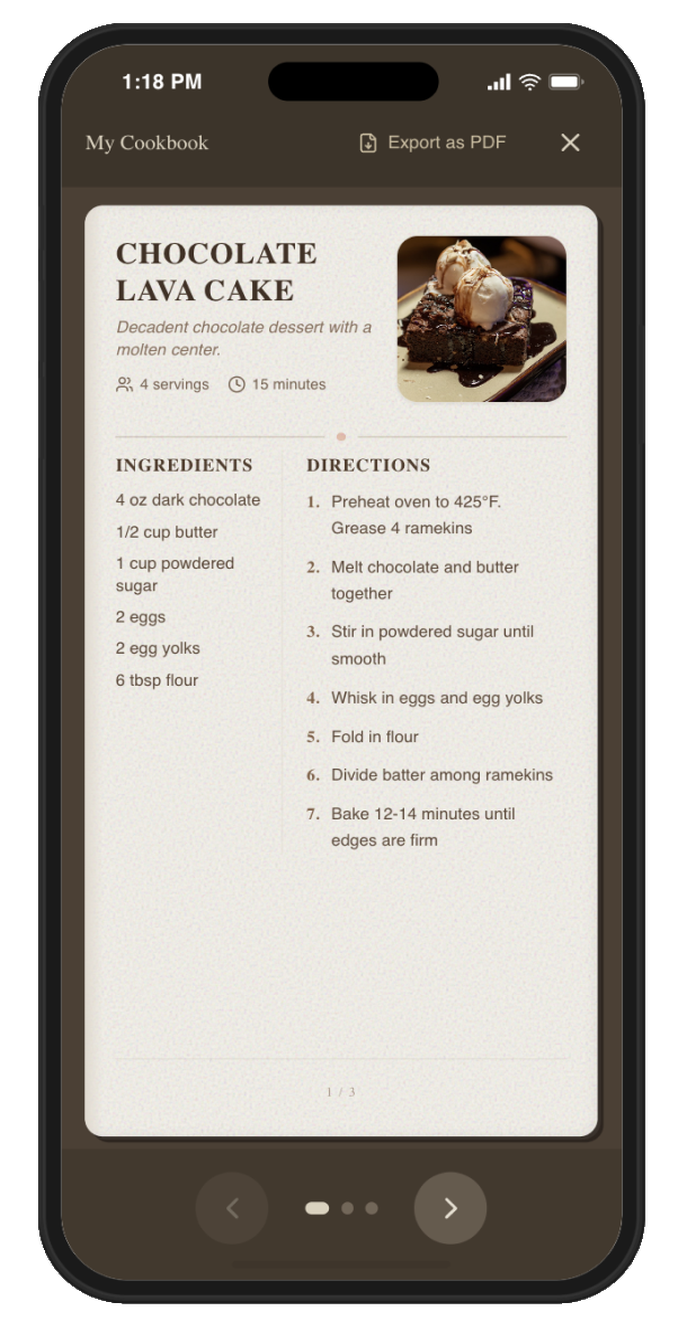
Cookbook Feature
Problem: Users often collect recipes but struggle to organize them long-term.
Decision: Allow users to create digital cookbooks and export them as PDFs.
Impact: Helps preserve recipes and enables easy sharing with friends and family.
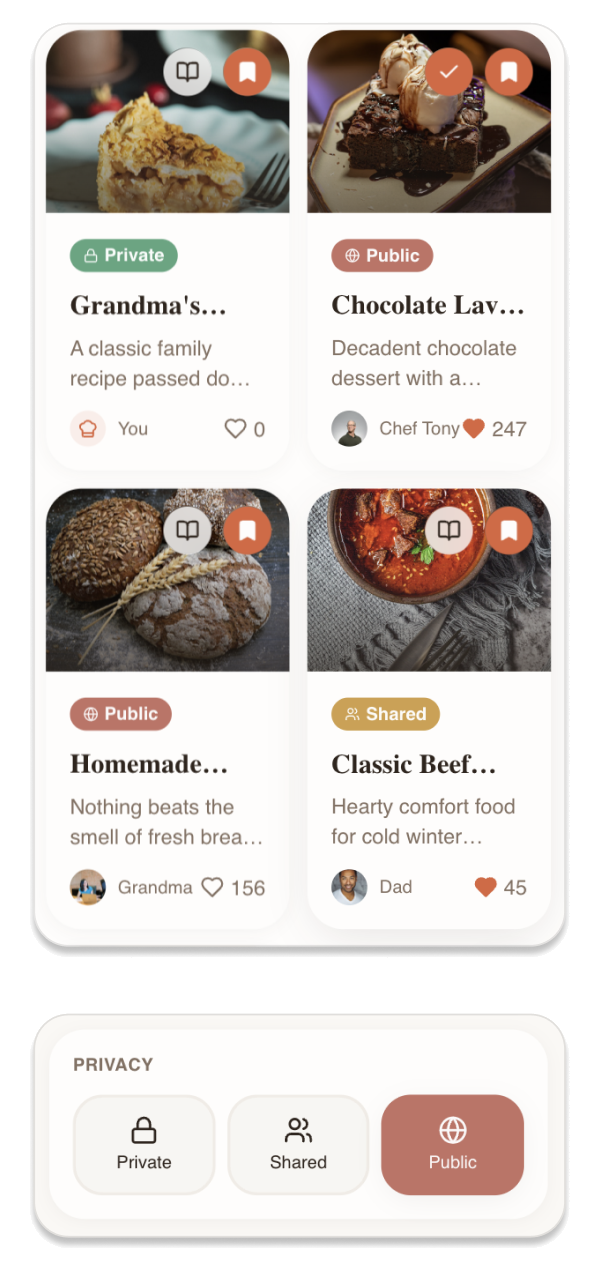
Recipe Privacy Controls
Problem: Some recipes are meant to be shared while others are personal.
Decision: Allow users to mark recipes as Private, Shared, or Public.
Impact: Supports both personal recipe storage and social recipe sharing.
ITERATION & FEEDBACK
After creating the high-fidelity prototype, I shared the design with participants from the initial interviews to gather usability feedback. Participants were asked to explore the app and describe what they would click first, as well as identify anything confusing or unclear. This helped reveal areas where the interface could better communicate key actions.
Key Feedback
- Some users were initially unsure about the difference between Saved recipes and Cookbooks
- Icons on the recipe page (save, share, cookbook) were not immediately clear
- Users wanted a clearer label when creating collections
- Some participants expressed interest in adding multiple photos or ingredient links
“I’m not sure what the difference is between saving a recipe and adding it to a cookbook.”
Problem: Some users were unsure how certain features worked when first exploring the app, particularly the difference between saving recipes and organizing them into cookbooks.
Design Solution: To improve first-time usability, I introduced a guided onboarding flow using coach marks that highlights key actions such as saving recipes, creating cookbooks, and adding new recipes.
Impact: This helps new users quickly understand the core features without needing to explore the interface through trial and error.
REFLECTION
What I Learned
Designing RecipeNest helped me understand how important simplicity is when organizing personal information. Many existing recipe apps focus heavily on discovery, but users in my research cared more about preserving and organizing meaningful recipes from friends and family. This shifted my focus toward designing clear structures for saving, sharing, and organizing recipes rather than adding too many features.
This project also reinforced the importance of early feedback. Even small usability tests revealed confusion around certain features, which led to improvements like the guided onboarding flow.
Challenges
One challenge was balancing flexibility with simplicity. Recipes can contain many details, but I wanted the recipe creation flow to feel quick and approachable. Deciding which fields were essential versus optional required several iterations.
Another challenge was distinguishing between saving recipes and organizing them into cookbooks. Feedback showed that users did not immediately understand this difference, which led me to rethink how these actions were introduced to first-time users.
Next Steps
If I continued developing RecipeNest, I would explore several improvements based on user feedback:
- Allow users to upload handwritten family recipes as photos
- Support multiple photos within a recipe
- Add ingredient links for easier grocery shopping
- Improve the cookbook feature to better organize collections of recipes
I would also conduct additional usability testing with a larger group of users to further refine the organization and navigation of the app.
Final Takeaway
RecipeNest demonstrates how research, iteration, and simplicity can shape a more intuitive product experience. By focusing on how people actually discover and preserve recipes, the design prioritizes clarity, organization, and meaningful sharing.